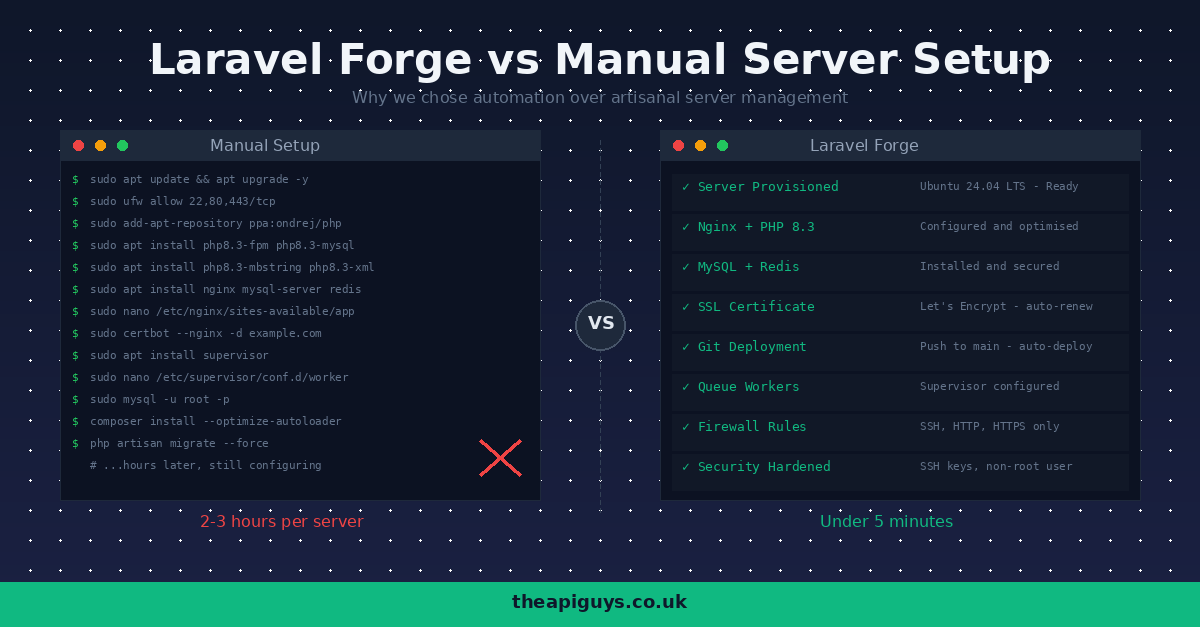
Laravel Forge vs Manual Server Setup - Why We Use Forge
Every Laravel developer reaches the same crossroads eventually. You have built your application, it works beautifully in local development, and now it needs to go live. The question is: how do you get from a fresh Ubuntu server to a production-ready environment? You can do it all by hand, or you can let a tool like Laravel Forge handle it. We have done both, and this is why Forge won.
What Manual Server Setup Actually Looks Like
If you have ever provisioned a server from scratch for a Laravel application, you know the process. It starts with a fresh Ubuntu install and quickly becomes a checklist that demands precision at every step.
First, you update the system packages, configure a firewall with UFW, set up a non-root user with SSH key authentication, and disable password-based login. Then you install Nginx and configure virtual hosts with the correct root directory, try_files directives, and PHP-FPM socket connections. Next comes PHP itself - the right version, the right extensions (mbstring, xml, curl, mysql, redis, zip, bcmath, and more), and the right FPM pool configuration for your expected traffic.
After that, you install and secure MySQL or PostgreSQL, create databases, set up users with appropriate privileges, and ensure the socket or connection is configured correctly. Then Redis for caching and queues. Then Composer. Then Node.js for building front-end assets. Then you clone your repository, set up environment files, generate keys, run migrations, set directory permissions, and configure your deployment process.
And you are still not finished. You need SSL certificates from Let's Encrypt with Certbot, automatic renewal via cron, queue workers managed by Supervisor, scheduled tasks in crontab, and log rotation. Every single step needs to be done correctly, in the right order, with the right permissions. Miss one thing and you are debugging at midnight wondering why your queue worker silently stopped or your SSL certificate expired without warning.
We know this process inside out because we have done it many times. We could write the Nginx config from memory. That is precisely why we stopped doing it.
What Forge Does Differently
Laravel Forge takes that entire manual process and reduces it to a few minutes of clicking. Connect your cloud provider account - whether that is DigitalOcean, Hetzner, AWS, Linode, or Vultr - choose your server size and region, and Forge provisions a fully configured Ubuntu server with everything a Laravel application needs.
Out of the box, you get Nginx configured and optimised for PHP applications, the latest stable PHP with all the extensions Laravel requires, MySQL or PostgreSQL ready to go, Redis installed and configured, Composer and Node.js available, and a firewall configured with sensible defaults. The server is ready to deploy a Laravel application within minutes, not hours.
But provisioning is only the beginning. The real value of Forge becomes apparent when you start deploying and managing applications day to day.
Deployments That Just Work
With a manual setup, deployments typically involve SSH-ing into the server, pulling the latest code, running Composer install, executing migrations, clearing caches, restarting queue workers, and hoping nothing breaks in the process. You might script this, and you should, but maintaining deployment scripts across multiple servers and projects adds its own overhead.
Forge gives you push-to-deploy out of the box. Connect your GitHub, GitLab, or Bitbucket repository, enable Quick Deploy, and every push to your main branch triggers an automatic deployment. The default deployment script handles everything: pulling code, installing dependencies, running migrations, clearing caches, and restarting workers. You can customise this script to fit your exact workflow, and every deployment is logged so you can see exactly what happened and when.
For teams that need it, Forge also supports zero-downtime deployments. Your application stays live throughout the entire deployment process, with the new version only going live once everything is ready. No more maintenance windows for routine deployments.
SSL Without the Headaches
SSL certificates should be simple, but manual management with Certbot and Let's Encrypt can be surprisingly fiddly. Initial setup is straightforward enough, but renewal failures, changed server configurations, and multi-domain certificates all introduce opportunities for things to go wrong. An expired SSL certificate is not just embarrassing - it actively drives users away and damages trust.
Forge handles SSL with a single click. Request a Let's Encrypt certificate for your domain, and Forge installs it, configures Nginx to use it, sets up HTTPS redirects, and manages automatic renewal. If you need to add additional domains or switch to a wildcard certificate, it is just as straightforward. We have not had a single SSL-related incident since moving to Forge, and that alone is worth the subscription.
Security You Do Not Have to Think About
Server security is one of those areas where the manual approach is particularly risky, not because the individual steps are difficult, but because it is easy to miss something. Did you disable root login? Did you configure the firewall correctly? Are you keeping packages updated? Is your SSH configuration hardened?
Forge provisions servers with security best practices from the start. SSH key authentication is enforced, firewalls are configured with only the necessary ports open, and the server is set up with a non-root user. Forge also makes it straightforward to manage firewall rules, SSH keys for team members, and server-level security settings through a clean interface rather than editing configuration files directly.
This does not mean you can ignore security entirely, but it does mean the baseline is solid from day one. You are building on top of a secure foundation rather than hoping you remembered every step in a hardening guide.
The Cost Argument
One objection we occasionally hear is that Forge adds an unnecessary cost. Why pay for a management tool when you can do everything yourself for free?
The Hobby plan starts at $12 per month for a single server. The Growth plan, which removes the server limit, is $19 per month. Consider what your time is worth. If manual server provisioning takes two to three hours, and you provision even a handful of servers per year, Forge pays for itself almost immediately. Factor in the time saved on deployments, SSL management, and security configuration across every project, and the maths becomes obvious.
We also find that Forge reduces the risk of costly mistakes. A misconfigured firewall, an expired SSL certificate, or a failed deployment on a Friday evening all cost real money in lost time and client trust. Forge does not eliminate every possible issue, but it removes an entire category of problems that we no longer need to worry about.
When Manual Setup Still Makes Sense
We are not suggesting that every developer should use Forge in every situation. If you are learning server administration, setting up servers manually is an invaluable education. Understanding what Nginx is doing, how PHP-FPM pools work, and how to configure a firewall makes you a better developer even if you never do it in production again.
There are also edge cases where you need server configurations that Forge does not support out of the box, or environments where a custom provisioning tool like Ansible or Terraform is more appropriate. For large-scale infrastructure with dozens of servers, dedicated DevOps tooling might be the better fit.
But for the vast majority of Laravel projects - and certainly for the kind of work we do building APIs and web applications for clients - Forge hits the sweet spot between control and convenience.
Our Workflow Today
Our typical setup looks like this: a client project is built in Laravel with a React or NextJS front end. When it is ready for deployment, we provision a server on DigitalOcean or Hetzner through Forge, running Ubuntu LTS with Nginx, PHP, MySQL, and Redis. We connect the Git repository, configure environment variables, set up SSL, and deploy. The whole process takes under fifteen minutes.
After that, deployments are automatic. Push to main, and the application updates itself. SSL certificates renew without intervention. Queue workers and scheduled tasks run reliably. We spend our time building features and fixing bugs, not managing servers.
If you are a Laravel developer still provisioning servers by hand, give Forge a serious look. The time it gives you back is time better spent on the work that actually matters to your clients.